When an engineer is looking for the right part, it is often about more than a few lost minutes. Data quality, the link to the bill of materials, the correct purchase order and whether the company ends up recreating a component it has had for years are all at stake. This is exactly where smart search for CAD and BIM models proves its value.
3Dfindit is not just a CAD part library for downloading models. Deployed properly, it becomes a practical tool for reducing duplicates, standardising design data and better connecting the CAD environment with PDM and ERP systems. For companies that want to speed up design and make data more accurate across departments, it is a very strong step.
What is 3Dfindit and why does it matter for CAD teams?
3Dfindit is a search engine for CAD and BIM models that lets you quickly find exact 3D components from manufacturers. According to information on the 4CAD website, it offers both geometric and parametric search and is integrated into more than 35 systems. This matters most where design teams work with thousands of reused items.
The difference compared with downloading models from various websites is fundamental. Instead of hunting for parts manually, retyping dimensions and saving files to local folders, the team gets a more consistent way of working. Design data no longer piles up at random; instead, there is a clearer path to what the company already uses or can reuse.
The 3Dfindit page from 4CAD shows clearly that this is not just about searching for a component name. The system can search by shape, dimensions and technical parameters. That is the point where search stops being a passive database and starts working as an active defence against duplicates.
How duplicate CAD files come about
Duplicates in CAD data do not arise only because someone makes a mistake. They are often the result of an environment where data is not easy to find, versioned or linked to other systems. Engineers would rather create a new model than spend ten minutes searching for the original. When that happens a hundred times a year, it adds up to an expensive, invisible loss.
Another problem is naming. One and the same part can be stored under different names, in different folders and in different versions. The team then has to do detective work on top of the engineering. This slows down design, complicates approvals and increases the risk of errors in bills of materials.
The typical causes are very practical:
- inconsistent file naming
- local libraries without version control
- repeated manual modelling of the same parts
- no link between CAD and ERP
- unclear approval of changes
When these factors combine, the result is not just duplicate models. It also means duplicate items in the ERP, inconsistent BOMs, inaccurate purchasing and unnecessary disruption in production.
Geometric and parametric search in practice
This is where 3Dfindit differs from conventional part libraries. If the engineer does not know the exact part designation, they can search by geometry or by parameters. This is very effective when you need to find a similar component with a different length, diameter, load capacity or mounting configuration.
Geometric search helps when a physical or digital template exists and the team needs to find the matching standard component. Parametric search is particularly strong for standard parts and catalogue components, where dimensions, material, thread, tolerance or manufacturer are decisive.
The practical benefits for design show up quickly:
- Fewer new models: the team more often reuses an existing component instead of creating yet another variant
- More accurate selection: searching by dimensions reduces the risk of using a similar but unsuitable part
- Faster CAD work: less manual modelling and fewer corrections in assemblies
- Better link to purchasing: a greater chance that the design uses an item that can actually be ordered from the manufacturer
The 4CAD website states that 3Dfindit works with data from thousands of suppliers. In practice, this means a wider choice and less pressure to improvise. Engineers no longer reach for an approximate substitute just because the right model cannot be found quickly.
Integrating 3Dfindit with CAD systems beats a stand-alone catalogue
A stand-alone model database is useful, but the full benefit only comes when search is available directly in the design environment. According to 4CAD, 3Dfindit is integrated into more than 35 systems, which is crucial for engineering companies. Search then takes place where the model is actually created.
That changes working habits. Engineers do not have to switch between the web, local folders and the CAD application. Instead, they search, compare and insert data in one process. This leaves less room for improvised saving of files to the desktop or personal folders, which over time turn into uncontrolled parallel libraries.
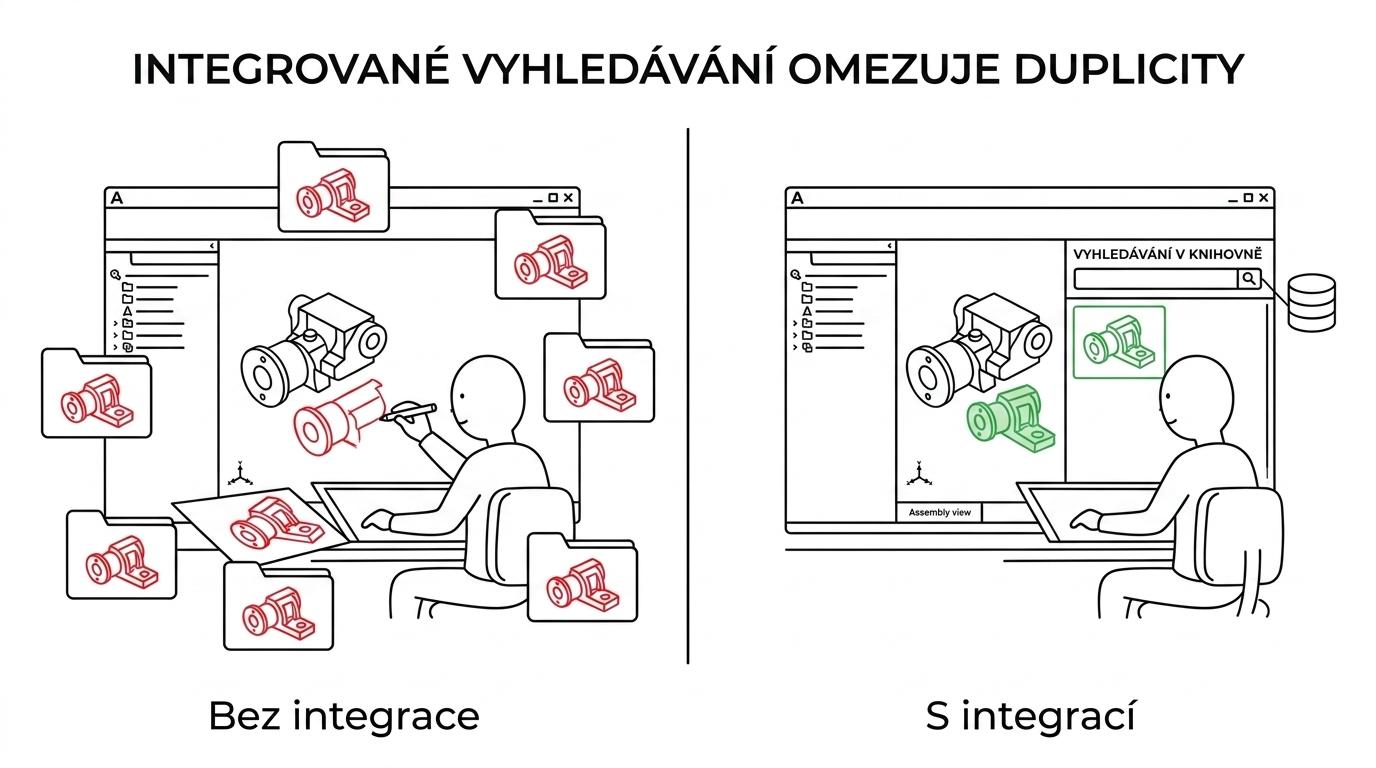
Modern PDM approaches support a similar principle. Onshape has long emphasised working without duplicate variants that escape revision control. Translated into everyday practice, this means one simple thing: when the team can easily find the right model and works with a controlled version at the same time, the need to create extra copies “just in case” drops.
Without version control, duplicates come back
Smart search alone is not enough. If the company does not link 3Dfindit to version management and approval processes, part of the problem remains. You may find the model, but it may not be clear whether it is the current version, an approved variant or a historical file.
This is where PDM comes in. SOLIDWORKS PDM is built on version control, i.e. access to the latest files in a managed vault. Onshape goes even further with its cloud-based PDM directly in the CAD environment. In both cases, the goal is similar: to maintain a single trusted source of truth about the product.
Below is a brief overview of where duplicates most often arise and what works against them:
| Area | Typical problem | Suitable solution |
|---|---|---|
| Component libraries | the same part stored several times | 3Dfindit, central library |
| Design files | copies without a clear revision | PDM and version control |
| Bills of materials | manual retyping of data from CAD | direct CAD/ERP integration |
| Company data | different item names | consistent classification and Item Master |
| Change approval | unclear which variant is valid | workflow and change audit |
When a company combines search, versioning and BOM management, it gains a much more stable data foundation for both production and purchasing.
Connecting CAD and ERP systems reduces manual retyping of data
A very common source of errors lies not in the model itself but in the manual transfer of information between design and ERP. An engineer creates a part and outputs the BOM, someone else creates the item in the ERP, and yet another person adjusts the purchase order. Each manual transfer is a small risk that multiplies quickly at higher volumes.
According to official Epicor information, CADLink can create the Item Master and Bill of Materials from CAD data with a single click, supports bidirectional data transfer and lets you compare BOM changes before saving. This is a very valuable principle for the wider market too: when the ERP takes data directly from design, the number of administrative errors drops significantly.
Automation from 4CAD with DriveWorks points in the same direction. The 4CAD website describes bidirectional data exchange with company systems, communication with the ERP without custom code, and connections via ODBC or Microsoft SQL Server. For many companies, this is a realistic way to connect design, sales and production without lengthy development of integrations from scratch.
Such an architecture usually delivers these results:
- One item, many uses: the same data serves design, purchasing and production
- Fewer manual interventions: no more repeated retyping of names, parameters and quantities
- Better change control: BOM revisions are traceable and easier to compare
- Higher ERP data quality: items match what was actually created in CAD
How to set up the process so that 3Dfindit really prevents duplicates
The biggest benefit comes not from the licence itself but from setting the rules. The company needs to decide where catalogue parts may be inserted from, how they are named, how they map to the ERP and who is responsible for approving new items. Without this framework, even a high-quality tool can end up as yet another isolated data source.
A simple model works well. Standard components are searched via 3Dfindit, internal non-standard parts go through the PDM workflow, and only approved items are created in the ERP. This separates catalogue components from company know-how and, at the same time, prevents unnecessary copies of the same part.
A sensible start might look like this:
- Map the part groups that are most often duplicated.
- Set up a central way of searching and saving.
- Connect CAD with PDM and define version control.
- Link BOMs and items to the ERP.
- Regularly clean up old libraries and uncontrolled local folders.
This approach is not complicated if it is done in stages. The first results are usually visible within a few weeks, especially for standard purchased components.
Where 3Dfindit delivers the greatest benefit
It has proven particularly effective in mechanical engineering, automation, jig and fixture manufacturing, production line design, facility solutions and engineering offices that work with extensive libraries of recurring components. Any environment where catalogue parts are used frequently can gain a faster pace of work and cleaner data.
It also has an interesting impact on cross-disciplinary collaboration. When the designer, the engineer and purchasing work with the same items and parameters, there is less ambiguity in communication. This benefits not only the design itself but also pricing, orders and service.
For companies tackling broader digitalisation, it makes sense to combine 3Dfindit with other tools from the 4CAD portfolio. Alongside PDM and ERP integrations, this can include design automation with DriveWorks or broader work with technical data in a CAD/CAM environment. If you are looking for wider context on digitalising design, the expert articles on Techcad.cz are also useful, as they often deal with the link between design, data management and production.
What to look for when choosing a solution for CAD search and ERP integration
When deciding, it is not a good idea to judge only by the number of available models. More important is whether the solution fits into the team's daily work and whether it helps with data discipline. That is what determines whether 3Dfindit is seen as a real time saver or just another database alongside the others.
It is therefore worth assessing several criteria at once:
- CAD integration: so that search takes place directly in the engineer's working environment
- PDM connection: so that it is clear which file version is valid
- ERP link: so that BOMs and items are not created by manual retyping
- Quality of catalogue data: so that the model matches a component that is actually available
- Management of internal standards: so that the company can combine catalogue parts with its own libraries without chaos
Where these criteria come together, 3Dfindit turns from a search engine into part of the company's data strategy. And that is precisely its greatest strength. It is not just about finding a part faster, but about more accurate design decisions, cleaner BOMs and fewer duplicates holding back the whole business.