When manufacturing documentation is created manually from a 3D model, every change costs extra time. Dimensions are retyped, views are rearranged, BOMs are checked by hand, and the shop floor can easily lose track of which version is valid. 4CAD solution helps engineering and manufacturing companies set up 3D modelling for manufacturing documentation so that the model is not just a reference but the real data source for drawings, PMI and downstream documents.
At 4CAD, we deliver tailored solutions for SOLIDWORKS, Inventor and the connected CAD workflow. Depending on the type of production, we deploy automatic generation of drawings and BOMs, model-based definition, or a combination of both, so that your documentation reflects how you actually design, manufacture and pass on data today.
Manufacturing documentation from 3D models for engineering and manufacturing companies
If you already create 3D models, it makes sense to get the most out of them. 4CAD solution sets up a workflow in which the 3D model serves as the source of manufacturing information, annotations and subsequent inspections, instead of the same data being maintained separately in several files.

"4CAD deploys CAD automation with more than 30 generative tasks for fast creation of accurate production drawings."
This is particularly suitable for companies dealing with frequent design changes, product variants, repeated documentation of similar assemblies or pressure to shorten the time between design and production. Instead of redrawing by hand, you get a controlled process in which a change in the model carries through more reliably to the drawing, the BOM and the exports for other departments.
We most often help in situations like these:
- Repeated production of variants: the same types of parts and assemblies differ in size, configuration or equipment.
- Frequent documentation revisions: a model change requires drawings and exports to be regenerated quickly.
- Moving from 2D routine to a data-driven CAD process: you want to reduce manual intervention and standardise your company practice.
4CAD solution is not just a software supplier. We are a team of certified experts in CAD/CAM, design automation and 3D technologies, so we also make sure the outputs actually work for design engineers, process engineers, purchasing and production.
4CAD solution automates drawings, BOMs and documentation publishing
For companies that want to speed up the creation of drawings directly from the model, 4CAD solution deploys tools such as MecAgent or DriveWorks Pro. MecAgent can automatically create a production drawing from a 3D model, including views, tables, annotations and standard drawing elements. DriveWorks Pro supports automatic creation of sales and manufacturing documentation and saves SOLIDWORKS parts, assemblies and drawings in eDrawings, DXF and PDF formats.
"4CAD supplies MecAgent integrated into SOLIDWORKS or Inventor with local support in Czech and Slovak."
For you, this means less manual work on every order and less dependence on who happens to be preparing the documentation. When the logic for creating drawings, tables or exports is set up in the system, documentation behaves more predictably and is easier to standardise across the team.
Depending on the project goal, we usually choose one of these solutions:
| Company need | Solution from 4CAD | What you gain |
|---|---|---|
| Fast generation of production drawings from a finished 3D model | MecAgent | Automatic views, tables, annotations and standard drawing elements |
| Product variants and repeated configurations | DriveWorks Pro | Automated sales and manufacturing documentation and reuse of design rules |
| Handing over manufacturing data directly in the model | MBD workflow | 3D dimensions, tolerances, PMI and publishing to 3D PDF, eDrawings or STEP 242 |
4CAD solution can also combine documentation automation with the wider CAD process. So if you are dealing not only with drawings but also with design standardisation, data checks or links to other departments, we set up the workflow so that documentation is not created in isolation.
Model-based definition and PMI in CAD: when the 3D model carries the manufacturing data
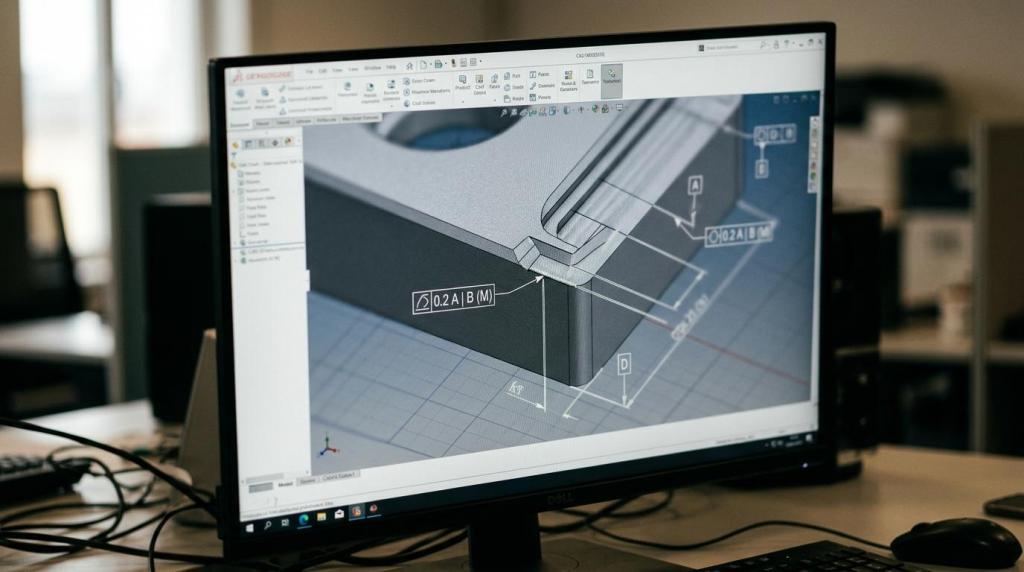
Not every company wants to stick with the classic combination of a model plus a separate 2D drawing. 4CAD solution also helps with model-based definition workflows, in which manufacturing information is embedded directly in the 3D CAD model as a centralised source of truth for design, production and data exchange.
"4CAD can set up publishing of manufacturing documentation from the 3D model to 3D PDF, eDrawings and STEP 242."
In practice, this means that the 3D model can carry dimensions, tolerances, datums, notes, BOMs and other PMI without everything having to be maintained separately in a parallel 2D file. In SOLIDWORKS MBD, these 3D annotations can be organised and published to commonly used formats, including 3D PDF, eDrawings and STEP 242.
This is useful wherever you need to pass data to production, suppliers or quality control in a clear and up-to-date form. Publishing templates can also be adapted for part or assembly specifications, RFQs or incoming inspection reports, so the model serves not only the design engineer but also downstream roles.
4CAD solution does not have to push a company into an abrupt change. A hybrid approach often makes sense: you continue to generate classic 2D drawings for some orders and already hand over manufacturing information directly in the 3D model for selected projects.
How 4CAD puts manufacturing documentation from 3D models into practice
Every company has different drawing standards, different naming conventions and a different degree of repeatability. That is why at 4CAD we do not start by selling a licence, but by looking at how documentation is actually created today and where it costs you time.
A typical process looks like this:
- Analysis of the current CAD workflow: we review where the data comes from, where manual intervention occurs and which documents need to be produced.
- Design of the target solution: we determine whether automatic drawing generation, an MBD workflow or a combination of both is the better fit.
- Setting up templates and rules: we prepare the logic for views, tables, annotations, BOMs and publishing formats according to your standards.
- Pilot, fine-tuning and training: we verify everything on a real part or assembly and train your team in Czech or Slovak.
In this way, 4CAD solution reduces the risk of you buying a tool that ends up unused. Already in the pilot, it becomes clear what will be generated automatically, what stays under the design engineer's control and what the specific outputs for production will look like.
Clarity on price and project scope also matters. The scope of implementation depends on how many product families you handle, how complex the documentation rules are and how many output formats you need. That is why 4CAD makes the most sense where you want to base the investment on a real volume of repetitive work, not on a general promise of automation.
When 4CAD is the right choice for manufacturing documentation from 3D models
4CAD solution is a good choice when you already have 3D models, but the manufacturing documentation around them is slow, inconsistent or unnecessarily dependent on manual work. Typically, these are engineering and manufacturing companies that use SOLIDWORKS or Inventor, work with variants and need to publish outputs quickly for production, purchasing or quality control.
We are also strong when you need to combine software, methodology and local support in a single project. 4CAD supplies the tools, sets up the process, trains users and takes care of the link to other CAD data, so you do not have to piece together a solution from several suppliers with no clear responsibility.
If, on the other hand, you are only looking for a universal template with no link to your actual production process, the benefit will be smaller. 4CAD delivers the greatest value where you want to turn the 3D model into a reliable source of manufacturing information and remove repetitive routine from every new order.
Send us a sample model and your current drawing
Want to find out what can be automated in your company and what is already worth moving to MBD? Get in touch with 4CAD solution and send us a sample 3D model, a current drawing or a typical manufacturing documentation package.
In a joint consultation, we will assess whether automatic generation of drawings, BOMs and exports or a workflow with manufacturing information directly in the 3D model suits you better. You will then know exactly what can be accelerated, what can be standardised and which outputs your team can receive without unnecessary manual routine.