Many engineering and manufacturing companies face the same problem today: customers want faster responses, more variants and more accurate quotes, yet the design office still spends hours repeating work that has already been solved once. When similar assemblies, size ranges or custom modifications are modelled again and again, it puts needless pressure on deadlines, people and the quality of the output.
This is exactly where design automation makes strong business and technical sense. DriveWorks, built around a close link to SOLIDWORKS, turns design rules into a controlled process that produces new variants of parts, assemblies, drawings, quotes and manufacturing data. The result is not just faster modelling but, above all, a more consistent standard, fewer manual interventions and a smoother handover between sales, engineering and production.
What design automation with DriveWorks solves in a manufacturing company
In companies that build custom or configurable products, much of the work is repetitive. The principle of the product stays the same; what changes are dimensions, numbers of components, materials, accessories or the standards that apply. Instead of developing something new, the designer often ends up editing existing models, retyping parameters and checking that everything still fits together.
That is precisely the space for rules-based logic, in other words automation driven by rules. Instead of touching every variant by hand, you create rules that define what is allowed, what should be generated and which documents need to be produced. In this respect, DriveWorks captures engineering know-how and turns it into a repeatable process.
And it is not just about CAD. Once the logic is set up correctly, the same inputs can drive the quote, the price, the drawing, the bill of materials and the manufacturing data.
If the following situations keep coming up in your company, design automation is a very relevant topic:
- recurring custom variants
- parameters retyped by hand
- similar drawings created over and over
- long waits for engineering input before a quote can go out
- different results depending on which designer does the job
How DriveWorks works with SOLIDWORKS in practice
The basic principle is straightforward. In SOLIDWORKS, you create a reference model or assembly in which variables, relationships and rules are defined. DriveWorks then uses this template to generate new order-specific versions, i.e. variants for a particular order. The design team no longer works by opening an old file, overwriting dimensions, saving it under a new name and hoping nothing was left wrong.
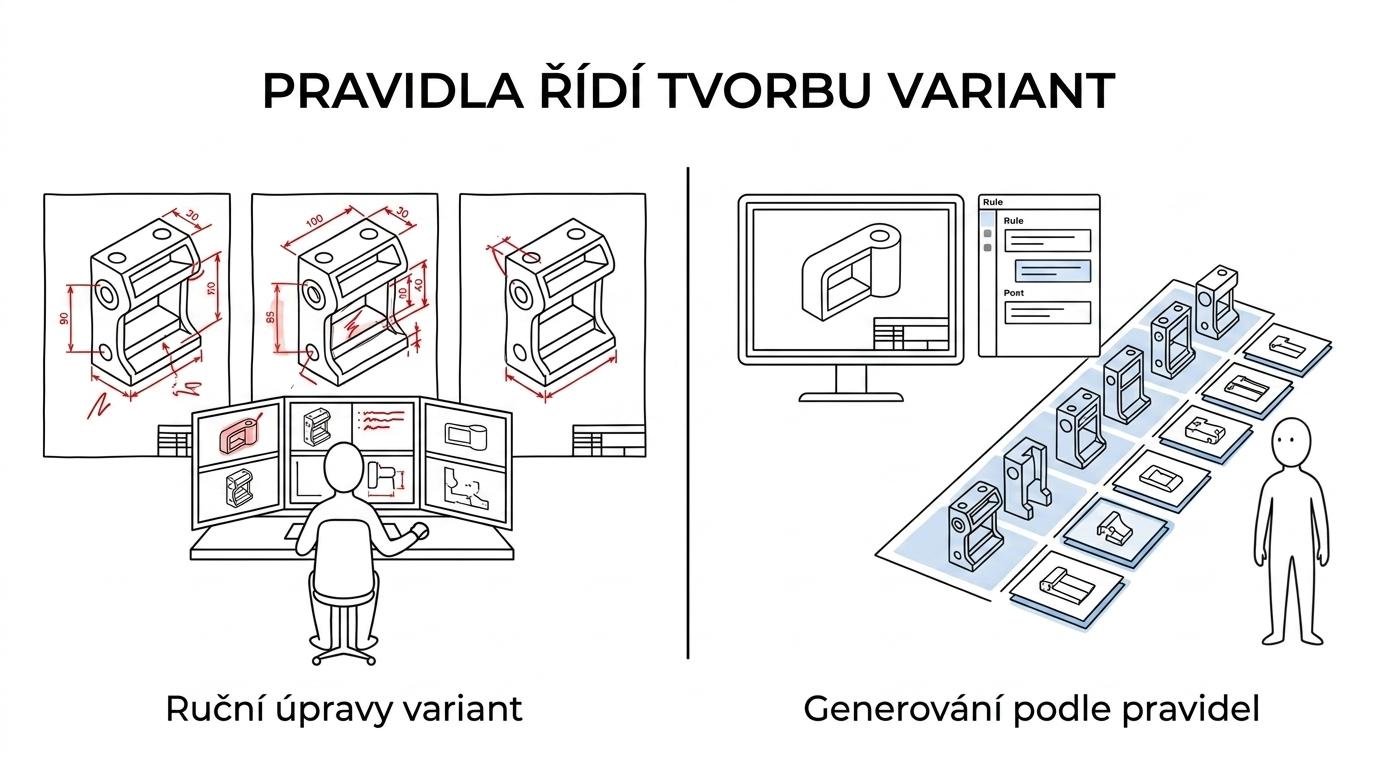
According to SOLIDWORKS, DriveWorksXpress is included free of charge with every SOLIDWORKS licence and can be activated directly from the Tools menu. For many companies this is an important entry point, because they can try out automation on a real assembly without a complicated start. DriveWorksXpress can automatically create new, specific variants of parts, assemblies and drawings right inside SOLIDWORKS.
Higher levels of deployment then add broader automation, sharing via the web, configuration for the sales team and connections to other company systems. According to official DriveWorks materials, master files are not overwritten during automation – an important point for companies that want to protect their reference design data while safely generating new variants from it.
Where design automation saves the most time
The biggest savings rarely come from one big step; they come from a long list of small tasks repeated every day: retyping dimensions, naming files, checking configurations, completing drawings, exporting PDFs, preparing bills of materials. Each of these looks insignificant on its own, but together they add up to high costs.
DriveWorks case studies confirm this in very concrete terms. Oasis Trailer Mfg. reported a 75 % reduction in design time, with one recurring configuration cut from 20 minutes to 5 minutes. The Rademaker case study cites engineering time reduced to under 15 minutes for modular units and 30% time savings already at the standardisation stage. Figures like these do not come from clicking faster in CAD, but from eliminating repetitive work.
| Area of work | Manual approach | Automation with DriveWorks |
|---|---|---|
| Product variants | manual edits to models and assemblies | rules-based generation of variants |
| Drawings | repeated copying and checking | automatic creation from templates |
| Pricing | waiting for data from engineering | configuration and price in one process |
| Error rate | dependence on individuals | standardised logic and validation |
| Handover to production | retyping between departments | consistent data and related documents |
DriveWorks CPQ connects sales, engineering and production
When people talk about design automation, many companies still picture nothing more than faster model generation. DriveWorks takes the value further. In CPQ – configure, price, quote – the same rules-based logic can also drive product configuration from the sales side, automatic price calculation and quote generation.
This is crucial wherever sales often has to wait for a technical feasibility check. Instead of a long email exchange, a salesperson or partner can configure the product in a browser via DriveWorks Live on any device. If the rules are well prepared, the system checks permitted combinations, calculates the price and creates the documents without manual intermediate steps.
DriveWorks describes this approach as a shared source of truth. In practice, it means that sales, engineering and production all work from the same product logic. Instead of three different interpretations of one order, there is a single controlled process.
In a well-configured environment, DriveWorks benefits several departments at once:
- Engineering: new models, assemblies and drawings are created automatically according to approved rules.
- Sales: product configuration, price and quote are produced without waiting for manual technical rework.
- Production: bills of materials and downstream data come from the same logic as the CAD model.
- Management: standardisation makes it easier to plan capacity, control margins and scale up orders.
When DriveWorks makes the most sense
Not every company needs full automation from day one. The greatest benefit usually comes where there is a repeatable product with multiple variants, clear design logic and pressure on turnaround time. Typical examples include steel structures, machine guarding, conveyor systems, process equipment, made-to-measure furniture, modular equipment or products with defined size ranges.
It also works well where a company wants to standardise the work of several designers. Automation is not only about speed – it also ensures that the same input leads to the same output, no matter who handles the order.

And standardisation is often a bigger benefit than the minutes saved.
How a DriveWorks implementation works, step by step
A successful rollout does not start with software, but with choosing the right product or assembly. The best candidate is one that recurs, follows clear rules and currently takes up far too much time. The first automated product should be simple enough to validate quickly, yet significant enough to show a real improvement.
Next comes mapping the logic. Which dimensions change, which options can be combined, when an extra part is added, how the drawing, price or bill of materials changes. At this stage, it often turns out that the company has had the rules for a long time – they just have not been formalised. DriveWorks turns them into a usable system.
A practical implementation stays clear when it follows a defined framework:
- Select a pilot product or assembly.
- Clean up and standardise the reference SOLIDWORKS models.
- Define parameters, rules and permitted variants.
- Set up the generation of drawings, documents and file names.
- Validate the results on real orders.
- Extend the solution to sales, production or CPQ.
The important point is that you do not have to automate everything at once. A very good approach is to start in engineering, evaluate the savings and only then add web-based configuration, pricing or ERP integration.
Connecting DriveWorks to other systems and data
Automation delivers the most value when it does not stop at the CAD model. If a company uses ERP, CRM or database sources, it makes sense to link item numbers, price lists, production codes, customer data or approval workflows. According to the published Rademaker reference, DriveWorks was connected to SAP using native SQL integration, which shows well that automation can also work as part of a wider company architecture.
This matters especially for companies that already run SOLIDWORKS and are looking for the next step towards standardisation. Useful information on CAD automation, SOLIDWORKS and related tools can also be followed on Techcad.cz, where similar topics appear in the wider context of digitalising development and production.
Your first step towards design automation in SOLIDWORKS
For many companies, the most sensible start is surprisingly small. Take one recurring assembly, measure today’s processing time, count the number of variants per month and compare that with the automation potential. Once the result is visible on one product line, it is much easier to decide on a wider rollout.
DriveWorks gives engineering and manufacturing companies a practical way to speed up design, reduce manual work and cut errors while keeping the link to SOLIDWORKS and to sales processes such as CPQ. It is not a fashionable add-on, but a real tool for companies that want to manufacture faster, with more certainty and without needless losses in repetitive design work.