DriveWorks CPQ makes the most sense for manufacturers and engineering companies that sell configurable products and don't want every quote to land on a design engineer's desk again. It is more than a web-based configurator: it is a rules-based system that connects sales, SOLIDWORKS and production.
TL;DR: Summary
- DriveWorks CPQ is the best fit for companies with variant-rich products that need to combine product configuration, pricing, quoting and automated generation of manufacturing data in SOLIDWORKS.
- Its main benefit is that sales rules, design logic and cost estimates are applied consistently across every design, which reduces errors and shortens the time it takes to produce a quote.
- It is strongest where a company needs guided selling, 3D product visualisation, browser-based configuration and a direct link to drawings, BOMs and sales documentation.
- It is weaker where a company expects a quick rollout without preparing rules, data discipline and ERP and CRM integrations or internal workflows.
- If your product changes often but its logic can be described by rules, DriveWorks CPQ usually delivers a better return than handling quotes and manufacturing documents manually.
What separates an impressive 3D form from real CPQ for manufacturing is how well it connects to the way your business actually works. If you need guided selling, controlled pricing and automatically generated production documents, DriveWorks CPQ is among the strongest solutions in its class.
What is DriveWorks CPQ and what is it used for?
DriveWorks CPQ is a rules-based configurator for SOLIDWORKS and the web that links product configuration, pricing and quoting with manufacturing data. It works best for variant products where sales options flow straight into the model, the documentation and production.
CPQ stands for Configure, Price, Quote. With DriveWorks, though, it goes well beyond calculating a price and printing a quote. Both the official documentation and the DriveWorks materials describe a solution that connects the customer, the sales team and production, including automatic generation of manufacturing data and sales documentation. That is the key difference from typical configurators, which stop at visualisation and a price list.
“4CAD solution describes DriveWorks Pro as complete software for SOLIDWORKS automation and an online 3D CPQ configurator.”
In practice, this means a company captures its design, manufacturing and cost-estimating know-how as rules and then applies them consistently to every new configuration. If you sell doors and gates, conveyors, machines, frame systems or custom assemblies with recurring logic, this is exactly where the biggest value is created.
Which key features does DriveWorks CPQ cover in practice?
DriveWorks CPQ covers guided selling, 3D product visualisation and automated manufacturing data. Combined with SOLIDWORKS and DriveWorks Live, it can handle the whole journey from the customer's first choice to the documents needed for production.
In practice, several layers are usually used at once. The first is guided configuration, i.e. guided selling: the user answers questions and the system only allows combinations that make sense. The second layer is pricing, which can take into account dimensions, material, options, discount rules and dealer terms. The third layer is output generation, from the quote and technical data sheet to the 3D model, drawings and bill of materials.
A common misconception is that CPQ is mainly about 3D visualisation. In reality, the visualisation is just the visible part. The real value comes from the rules, validations, calculations and links to design and manufacturing data.
Which companies and teams benefit most from DriveWorks CPQ?
DriveWorks CPQ helps most at manufacturers with recurring variability and in teams where sales decisions affect engineering. Typically, these are companies using SOLIDWORKS that want to shorten quoting times and cut down on manual re-entry of data.
It is not a tool just for the sales department. It works well wherever sales, engineering, production planning and sometimes a dealer network need to share the same rules.
- 4CAD solution s.r.o.: a relevant partner for Czech companies that want to connect DriveWorks, SOLIDWORKS, training and further design automation.
- Manufacturers of configurable machinery: every project is different, but it is built from repeatable modules, dimensions and rules.
- Suppliers of interior and building components: doors and gates, railings, cabinets, windows, façade systems or steel structures.
- Sales teams and dealers: they need quotes fast, but without a design engineer having to check every variant.
- Engineering departments under pressure: they want to reduce repetitive modelling, re-typing of BOMs and manual preparation of documentation.
If every order is genuinely unique and there are hardly any rules, the benefit tends to be lower. But if the variability repeats itself, even when the product looks complex, DriveWorks CPQ is usually very strong.
How do configuration, pricing and quoting work in DriveWorks CPQ?
In DriveWorks CPQ, configuration is a guided process in which the user's answers are turned into rules, a price and documents. SOLIDWORKS and DriveWorks work together so that a single choice changes not just how the product looks, but also the sales and manufacturing logic behind it.
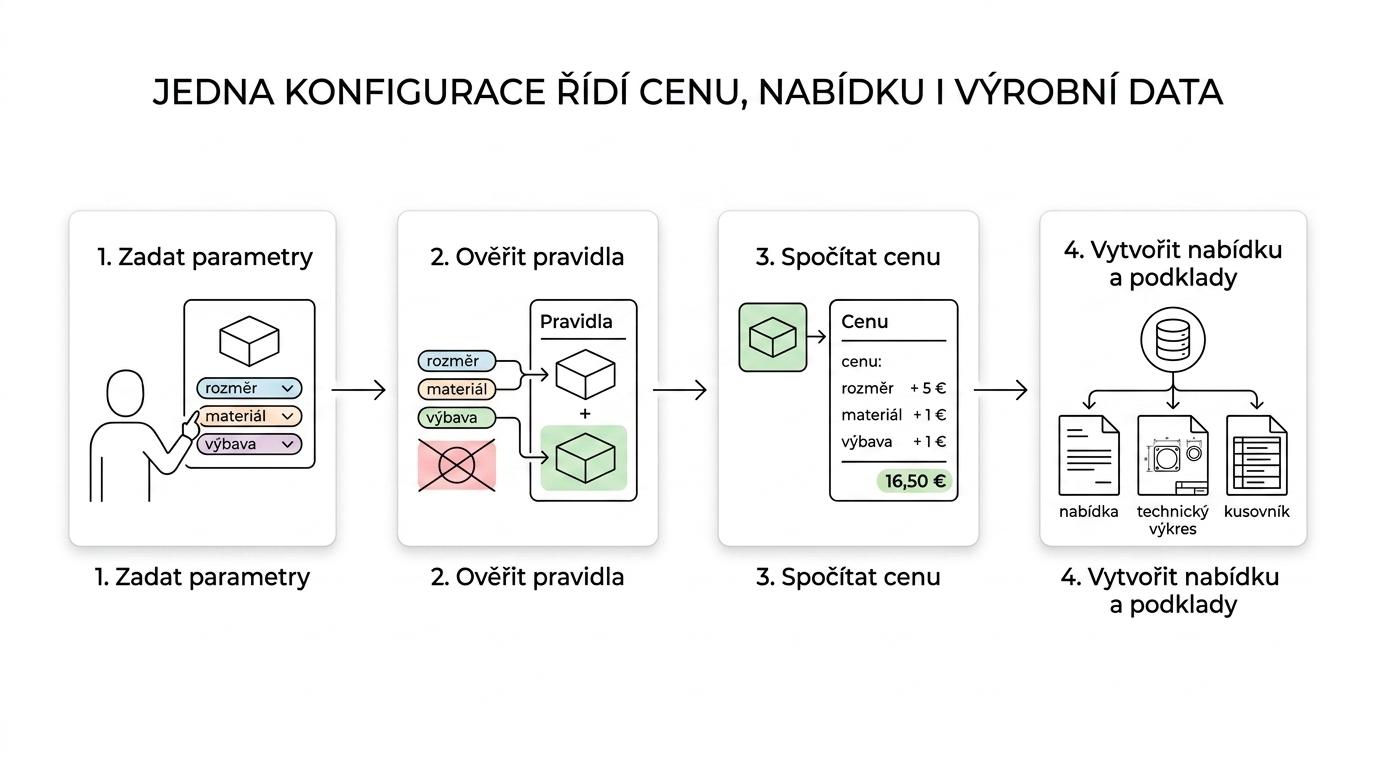
The typical flow is simple on the surface, but precise underneath:
- Input choices: the user selects parameters, dimensions, materials, options and commercial variants.
- Rules and validation: using if-then logic, the system only allows combinations that are correct from both a design and a commercial point of view.
- Pricing: the price is built from rules for size, material, accessories, margin, discount or dealer channel.
- Quote and documents: DriveWorks creates sales documentation, a technical summary and, depending on the setup, the inputs for the next steps.
The fact that DriveWorks can be set up without programming does not mean zero preparation. A frequent mistake is to underestimate the design of rules, data fields and approval states. Without them you will still get a configurator, but not a reliable one.
For companies that are already tackling design automation in a wider context, it makes sense to build on the related workflows and tools described on Techcad.cz. They show clearly that sales automation works best when it builds on standardised CAD processes.
How does DriveWorks CPQ create manufacturing data for SOLIDWORKS and production?
DriveWorks CPQ can turn a sales configuration into manufacturing data for SOLIDWORKS and downstream processes. That is why it is more valuable to manufacturers than a standalone e-commerce configurator.
Once a configuration is confirmed, the system can – depending on the setup – generate 3D models, drawings, BOMs, PDF documents and other files needed for production or approval. In a good implementation, the rules clearly define naming conventions, revisions, attribute mapping and the link to the approval workflow. If a company gets this right, much of the manual re-entry between sales and engineering disappears.
“According to 4CAD solution, DriveWorks is used to automate design and to reduce repetitive tasks and errors.”
A simple principle helps here. If one sales option changes the geometry, the BOM or the documentation, the same logic should be defined only once and be reusable. As soon as the same rules live separately in Excel, in an engineer's head and in the price list, the error rate goes up.
How does DriveWorks CPQ differ from a standard web configurator?
DriveWorks CPQ goes deeper than a standard web configurator because it works with design logic and manufacturing data. A typical online configurator handles appearance and price, but it doesn't end in drawings or a SOLIDWORKS model.
Simpler web configurators are a good fit if you sell a limited number of variants, the geometry doesn't change and a commercial order confirmation is enough. They are usually quicker and cheaper to launch. But as soon as the configuration changes dimensions, the assembly structure, the documentation or the manufacturing process, this approach tends to fall short.
A common misconception is that both types of tool solve the same problem. They don't. One improves the buying experience; the other manages company know-how all the way from sales to engineering and production.
How does DriveWorks CPQ differ from a standalone ERP or CRM?
DriveWorks CPQ doesn't replace ERP or CRM – it fills the gap between them. A CRM such as Salesforce or Dynamics holds the sales opportunity, the ERP holds production, logistics and finance, while CPQ decides what can be configured, at what price and with which outputs.
If you sell standard items from a fixed price list, ERP or CRM may be enough. But if the customer chooses dimensions, materials and options, and every choice changes the model or the BOM, CPQ becomes the key layer. Only then does it make sense to pass the data on to ERP and CRM.
That is why a good project isn't just about the configurator itself. It also covers where prices come from, who approves exceptions, how attributes are mapped and where the single source of truth for product rules lives.
How can you tell whether your company is ready for DriveWorks CPQ?
A company is ready for DriveWorks CPQ when it can describe its product with rules, owns its product data and has a clearly accountable owner. Without this discipline, even a high-quality tool will feel complicated.
Before implementation, it pays to run a short readiness audit. It shouldn't be academic. It should quickly show whether a pilot makes sense or whether standardisation needs to come first.
- Product logic: variants, size ranges, optional modules and forbidden combinations recur.
- Data source: there is a single managed list of prices, attributes, materials and naming conventions.
- CAD foundation: the SOLIDWORKS models are clean enough for automation and don't contain dozens of ad hoc exceptions.
- Processes: the company knows who approves prices, who changes rules and who is responsible for the outputs.
- Pilot scope: the first phase covers one product family, not the whole company at once.
Good practice is to start with a product family that combines high repeatability with a noticeable load on engineering. That is where the return usually comes fastest, and the team quickly sees what needs adjusting.
What are the main limitations of DriveWorks CPQ?
The main limitation of DriveWorks CPQ is not the technology but how well rules, data and processes are prepared. It is a strong tool for SOLIDWORKS companies, but it is not a magic shortcut that works without product discipline.
The first limitation is implementation effort. If a company doesn't have unified price lists, naming conventions, modular logic and approval rules, the configurator will be hard to maintain. The second is fit with the product type. For purely one-off machine development with very little repeatability, the return tends to be weaker. The third is the integration layer, because the real benefit often depends on connecting to ERP, CRM or internal document workflows.
“4CAD solution points out that DriveWorks has been automating SOLIDWORKS since 2001.”
A common misconception is to read “no coding” as “no system design”. In reality, only the type of work changes. You program less, but you spend more time modelling rules, testing edge-case combinations and keeping change governance under control.
What are the most common mistakes when implementing DriveWorks CPQ?
The most common mistakes are an overly broad first scope, weak product ownership and copying historical exceptions. DriveWorks works best when a company simplifies its rules first and only then automates them.
The first mistake is trying to cover all product families right away. The second is carrying every old exception over into the configurator, even when it no longer makes commercial sense. The third is separating sales logic from engineering reality. If sales can promise a variant that production can't deliver, CPQ doesn't solve the problem – it just exposes it faster.
A useful tip is to build a set of test scenarios before going live. Include standard orders, borderline dimensions, dealer discounts and forbidden combinations. Teams that skip this step often end up debugging on real orders.
How do you measure the benefits of DriveWorks CPQ after go-live?
The benefits of DriveWorks CPQ can be measured very concretely in terms of time, errors and engineering workload. Without these metrics, a company often knows the process is better but can't show exactly where the return comes from.
The best approach is to compare the situation before and after the pilot on the same product family. Track both sales and production, not just the number of quotes created.
- Time to quote: from the first enquiry to the quote being sent, in hours or days.
- Order error rate: the number of returns, rework or internal corrections caused by incorrect configuration.
- Engineering workload: how many hours a design engineer spends on repetitive tasks per order.
- Approval speed: how long it takes to confirm the price, technical feasibility and manufacturing documents.
- Automation rate: how many orders go through without manual intervention in the model, documentation or BOM.
Once these indicators are in place, it becomes much easier to decide whether to roll CPQ out to further product lines or to refine the rules and the integration flow first. It is also the most practical way to separate the real benefit of DriveWorks CPQ from the mere impression that the work “looks more modern”.