
When engineering teams talk about productivity, the conversation usually turns to modeling, workstation performance or version control. Yet just as often, work is held up by something far simpler: finding the right 3D model in time. For 4CAD solution, which specializes in CAD/CAM, design automation and 3D technologies, this lost time is a key topic, because it directly affects both design speed and the quality of reused data.
Key takeaways
- 3Dfindit saves designers the most time when they need to find a compatible part quickly in a large CAD parts library and don't want to remodel a component that already exists.
- According to official 3Dfindit sources, the tool is built on search methods such as Feature Search, Partial Search, Sketch Search and, optionally, Photo Search, so you are not limited to searching by file name.
- In 4CAD solution's view, the tool makes the most sense where part reuse meets CAD integration, BIM data and pressure to release documentation fast.
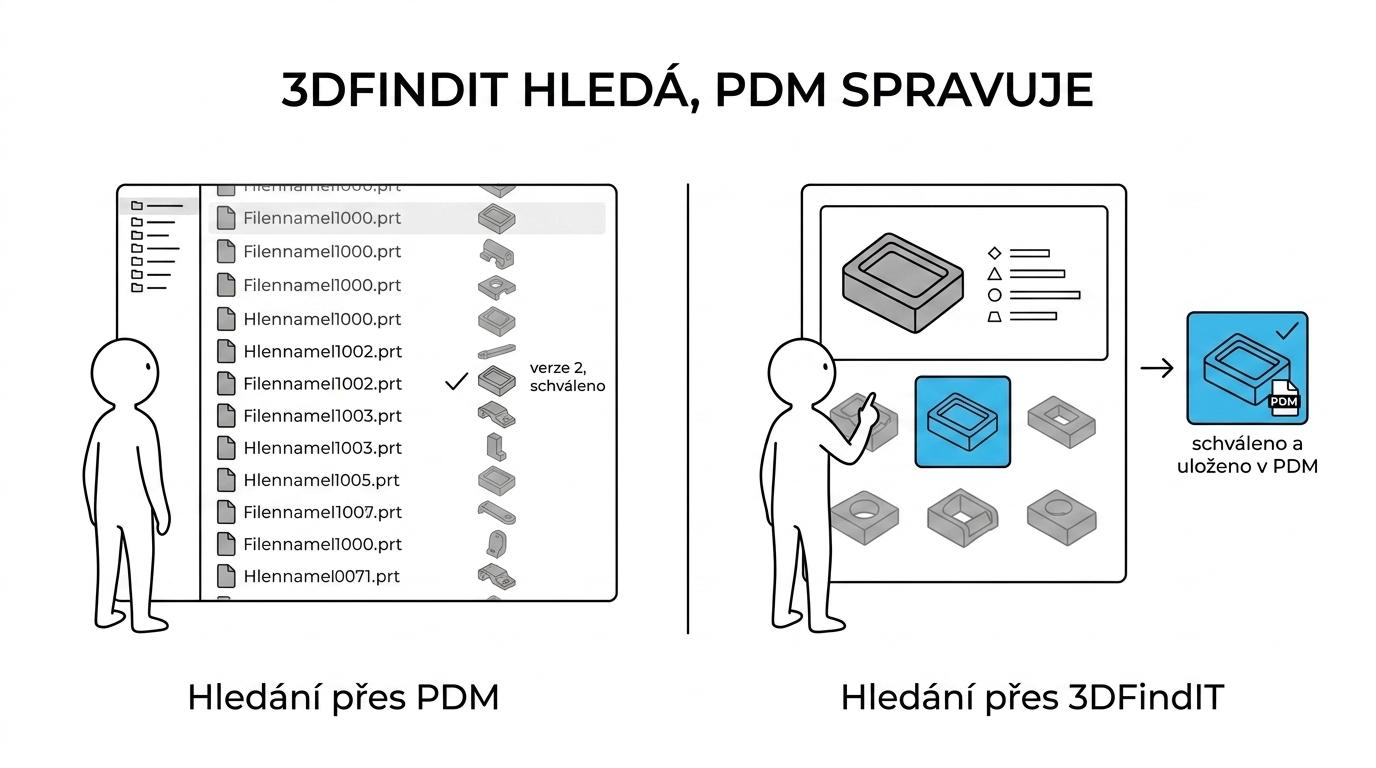
- If a company already runs PDM or ERP, 3Dfindit complements rather than replaces them: PDM handles versions and approvals, 3Dfindit speeds up finding the right component.
- It adds the least value with small libraries, poorly described data and highly custom parts that are modeled from scratch anyway.
So the deciding factor is not just what 3Dfindit can do, but when its capabilities match your real workflow. If your team regularly works with product catalogs, standard parts, BIM objects or configurable components, the benefit can show up very quickly in hours saved and fewer duplicate models.
When does 3Dfindit really speed up design work?
Above all in SOLIDWORKS projects or Revit projects with a large number of standard parts. 3Dfindit speeds things up whenever finding a compatible component is faster than modeling it again.
That sounds obvious, but this is exactly where expensive mistakes happen in practice. Designers often don't know whether the company, the manufacturer or a supplier already has the part ready in some form. Searching manually through folders, old projects, manufacturer websites and emails creates non-value-adding work that contributes nothing to the product's function.
Official 3Dfindit materials describe the tool as a visual search engine for 3D CAD and BIM models with access to an extensive 3D CAD database and manufacturer catalogs. This matters most when you are not just looking for "an M8 bolt", but for a specific configuration, size, mounting variant or BIM element with usable metadata.
Broader industry estimates show why this matters. In a community article, Dassault Systèmes cites a study according to which engineers may spend up to 45% of their time searching for or recreating existing parts. A Siemens partner article describes an even harsher scenario in which, without proper parts management, searching for and needlessly creating components takes up 68% of time on average. The exact figures will vary from company to company, but the direction is clear: the larger the library and the more repeated components, the more room there is to speed things up.
Can a folder or PDM find parts as well as 3Dfindit?
No. Neither a shared folder nor a standard PDM system offers the same visual search as Feature Search or Sketch Search in 3Dfindit. The difference lies in working with geometry, similarity and metadata, not just the file name.
A folder is only fast when you know exactly what you are looking for and how the file was named. PDM, in turn, handles versions, revisions, approvals and links to documentation well. But neither is necessarily the ideal tool when you remember the shape, the connection type or just part of the geometry, but not the exact part name.
This is where the features official 3Dfindit sources list as Feature Search, Partial Search, Sketch Search and, optionally, Photo Search come in. If you have a sketch, a similar part or just a visual idea, the system doesn't only search for a text string. It looks for geometric similarity, links to manufacturer catalogs and usable metadata. A common misconception is that a good PDM solves this problem automatically. It doesn't, unless there is an intelligent search layer on top of the content.
"4CAD solution counts 3Dfindit among the tools that save design time thanks to extensive libraries of CAD models."
Which real-world situations save the most time?
The biggest savings come with standard purchased parts, configurable catalogs and BIM elements. In every case, the point is to reuse verified models instead of drawing them by hand or digging through several catalogs.
In practice there is no single "magic" area, but several recurring scenarios where manual searching is unnecessarily expensive.
- Standardized fasteners and assembly parts: bolts, nuts, profiles, flanges or bearings, where the standard, size and compatibility are what count.
- Product catalogs with many variants: linear guides, pneumatics, drives, sensors or electrical components, where only a few parameters differ but there are hundreds of variants.
- BIM elements for architecture and building services: objects with metadata that must work not only geometrically, but also in terms of information.
- Replacing duplicate parts: when the team first checks whether a similar or identical component already exists before creating a new item.
- Handover between disciplines: when the same data is needed by designers, building engineers, production planning and purchasing.
It also pays to think about where the data comes from. 3Dfindit is built on manufacturer-certified product catalogs. This reduces the risk of pulling a good-looking but outdated model from an unclear source into your design.
Is the first 3Dfindit rollout quick, and how should a design team start?
Yes, the first rollout is usually quick if you start with one library and one CAD tool, for example SOLIDWORKS or Inventor. The goal is to shorten the path to a usable model, not to overhaul your entire data management.
The best results come from a pilot on one specific type of work. Choose a team that repeatedly uses purchased parts or often looks up components from the same manufacturers. If you try to sort out all libraries, classifications and processes in the first week, the benefit gets diluted.
Start with this simple framework:
- Choose an area: recurring purchased parts, standard mechanical components or frequently used BIM objects.
- Connect one main tool: one CAD system, one team and a clearly described process for where models come from and where they are stored.
- Measure the impact: search time, the number of newly created duplicate parts and the share of reuse versus new modeling.
A practical tip: don't judge success only by the number of downloaded models. What matters more is whether the model actually made it into the design, passed review and cut the time to documentation release. Skip this step and it's easy to mistake "activity in the tool" for a real benefit to engineering.
How do you check that a model you found is really right for the design?
You can't tell the right model by its shape alone. What counts are the dimensions, metadata, manufacturer standard, configuration and the target format for CAD or BIM.
The first check is geometric. Do the connection dimensions, mounting points, envelope dimensions and orientation fit? If not, shape similarity is useless. The second check is about information. Do the metadata, manufacturer designation, product series, variant, material or technical specification match? The third check concerns the process. Is the model suitable for your environment, i.e. native CAD, a neutral format, a BIM workflow or other downstream systems?
A common mistake is to treat a downloaded model as the final truth. If the design is sensitive to assembly accuracy, the bill of materials or the link to ERP, you need to verify not only the geometry but also the identity of the part. If you have the right shape but the wrong configuration, all you get is a faster route to an error.

This applies twice over in BIM and building engineering data. There, dimensions may not be the only deciding factor: classification, parameters for coordinating disciplines or the link to the manufacturer's documentation can matter just as much. In such cases, a "lightweight" 3D object without good metadata is less useful than a precisely described model with a clear origin.
"4CAD solution works with integrations for Revit, AutoCAD, Archicad and SOLIDWORKS, so the right model is always the one that also holds up in the target CAD environment."
Is 3Dfindit better for new designs or for reusing existing parts?
3Dfindit is stronger for reuse than for pure greenfield design. If a part exists in a manufacturer's catalog, finding and configuring it is usually faster than modeling it from scratch in CAD.
That doesn't mean the tool is only useful for copying old solutions. In the early design phase, it helps you quickly check which components are on the market, in which sizes and with what geometry. Designers can then size the available space more realistically and spot collisions or unsuitable variants earlier.
The trade-off is simple. If you are designing a unique part with a non-standard function, 3Dfindit won't create the model for you. It will help more with the surrounding components, interfaces and purchased parts. If, on the other hand, you are working on an assembly made up of many common components, the benefit tends to be high and immediate.
A practical tip: don't confuse catalog search with reverse engineering. When you start from a point cloud, mesh data or a physical part without documentation, it's a different kind of task. There, a workflow for processing 3D data and reconstructing geometry makes more sense than a catalog search.
How does CAD and BIM integration change everyday work?
For 4CAD solution, 3Dfindit makes the most sense in teams that switch between SOLIDWORKS, AutoCAD, Revit or Archicad. Integration cuts down the switching between the web, the manufacturer's catalog and the open design.
In a normal working day, that's a bigger change than it seems. Designers don't just want to find a model. They want to get it into the right environment in a usable format, at a sensible level of detail and with metadata that doesn't end up outside the bill of materials or the BIM workflow. The fewer manual steps between search and insertion into the design, the better the chance that the tool will actually catch on.
The Autodesk App Store provides a strong argument too: it describes the 3Dfindit plugin as giving access to millions of 3D CAD, CAE and BIM models from more than 6,000 manufacturer catalogs. The listing also highlights intelligent models with rich metadata for architecture, structural engineering and building services. This matters especially for companies that connect mechanical design, building design and 3D data management across disciplines.
What if the company already has a PDM or ERP system?
4CAD solution would not position 3Dfindit against PDM or ERP, because it addresses a different layer of work. PDM takes care of versions and approvals, ERP of purchasing and master data, while 3Dfindit speeds up finding the right component.
First, describe where delays happen today. If people spend time because they simply can't find a suitable part, the problem is search. If they find the part but don't know whether it's approved, the problem lies in PDM or an internal process. If they can't turn the model they found into a purchase, the problem lies in ERP or in the code lists.
Then introduce a simple rule: 3Dfindit is for discovery and preselection, PDM for verification and management, ERP for commercial and logistics confirmation. Reverse this logic and people will expect one tool to do everything, and end up disappointed. A common mistake is wanting a search engine to fully replace product lifecycle management. It won't.
The third step is governance. When a designer downloads a model from a manufacturer's catalog, it must be clear when it is stored only as a temporary reference and when it becomes an internally approved part. Only then will you see whether 3Dfindit speeds up not just the search, but the entire flow of 3D data in the company.
When won't 3Dfindit speed up your work?
Sometimes the gain is small. With small libraries, purely custom parts or poorly described data, 3Dfindit won't deliver a significant speed-up.
If a company has a few dozen well-known items and models most of its critical components itself anyway, the effect will be limited. Nor will it help where the team doesn't work with catalog components or doesn't need external 3D CAD and BIM models. In such cases, the bigger benefit often lies in parameterization, design automation or better management of internal data.
Another limit is input quality. When internal libraries are inaccurate, names inconsistent and reuse rules unclear, a search tool is more likely to expose the problem than solve it. So if you are after a quick improvement but your company's data lacks basic order, start with the process first and only then with the tool.
This is where realistic expectations are set. 3Dfindit is not a shortcut to good design without discipline. It is a very powerful layer on top of 3D data wherever it already makes sense to search, compare, reuse and carry the right models into the next CAD or BIM step.


